Airflow on Kubernetes, Part 3: Executors and the Execution Lifecycle
When to use Local vs Celery vs Kubernetes (and multi-executor), the full task lifecycle, how a worker actually gets its task, and what happens when code changes mid-run.
Choosing an executor sets the latency, isolation, and cost profile of every task. Swapping later is possible (multi-executor in 2.10+ makes it cheaper than it used to be), but it still pulls in broker, worker, or RBAC changes alongside the config flip, so the choice is worth getting right up front. Understanding the lifecycle (how a task instance moves from “the scheduler noticed it” to “a process ran your code”) is what lets you debug the weird states. And the question that started this whole series for me: what happens if someone pushes new DAG code while a run is in flight? The answer in Airflow 3 is genuinely different from Airflow 2.
The executor is not a separate process
First, kill a common misconception. The executor is not a thing you deploy. The docs are explicit:
“The executor logic runs inside the scheduler process, and will run the tasks locally or not depending on the executor selected.” (Executor concepts)
So “switching executor” means changing [core] executor and giving the scheduler what it needs (a Celery broker, or RBAC to launch pods). The executor is the scheduler’s strategy for getting a task run somewhere.
When to use which executor

LocalExecutor runs tasks as subprocesses inside the scheduler process. Very low latency, trivial setup, but tasks share resources with the scheduler, a runaway task can starve scheduling. Fine for small single-machine production; not what you want on a busy cluster. (source)
CeleryExecutor is a queued/batch remote executor. The scheduler pushes workloads to a broker (Redis in the chart by default); persistent worker pods pull from it and each runs multiple tasks concurrently. Workers are warm, so latency is low and they’re cost-effective for a steady stream of many short tasks. The cost is the noisy-neighbour problem: tasks on the same worker compete for CPU/memory and share one environment. Best when your tasks are reasonably uniform and your load is roughly constant. (source)
KubernetesExecutor is a containerized remote executor. Every task gets its own pod, deployed when the task is queued and torn down when it finishes. Each task is fully isolated - no noisy neighbours - and you can customise resources, system libraries, even the image per task. The trade-offs are pod-startup latency (seconds per task) and inefficiency for very short tasks (you pay scheduling overhead each time). Best when tasks are heavyweight, need isolation, vary a lot in resource needs, or your load is spiky and you don’t want idle workers. (source)
Multi-executor (Airflow 2.10+). You no longer have to choose one globally. Set a comma-separated list; the first is the default, and any task or DAG can opt into another by name:
[core]
executor = CeleryExecutor,KubernetesExecutor
# This one task escapes the shared workers into its own pod
@task(executor="KubernetesExecutor")
def heavy_model_training():
...This is the modern replacement for the old CeleryKubernetesExecutor / LocalKubernetesExecutor hybrids, which were removed in Airflow 3.0. If you’re migrating from a hybrid, the multi-executor list is where you land. (source)
A pragmatic default for a Kubernetes shop: Celery as the workhorse for the long tail of small tasks, Kubernetes for the heavy or isolation-sensitive ones, via multi-executor.
Scaling Celery workers: KEDA over HPA
Celery workers are the one place in this stack you actually want to autoscale. The KubernetesExecutor scales itself for free (one pod per task, no replicas to tune); the scheduler and API server you keep at a fixed small count. Celery workers, though, are persistent pods sitting between a bursty queue and a steady stream of small tasks; exactly the shape that benefits from elasticity. The question is what signal to scale on, and that’s where the choice between HPA and KEDA matters.
HPA scales on resource utilisation. The built-in Kubernetes Horizontal Pod Autoscaler reads CPU and memory metrics and adjusts replica counts. For most workloads that’s the right signal; a saturated web server has high CPU. For Airflow workers it isn’t:
- A worker holding a long-running task that’s mostly waiting on I/O looks idle on CPU but is fully occupied; HPA would scale it down exactly when more workers are needed.
- A backlog of queued tasks the broker hasn’t handed out yet doesn’t move CPU on any existing worker; HPA sees no pressure and doesn’t scale up.
- CPU averages over a rolling window; queues spike in seconds. HPA tends to react late and overshoot.
The actual signal you want is broker queue depth: how many tasks are waiting in Redis to be picked up. That’s the load metric, and HPA can’t read it without a metrics adapter.
KEDA scales on the queue itself. KEDA (Kubernetes Event-Driven Autoscaling) is a controller that exposes external event sources (Redis, RabbitMQ, Kafka, SQS, …) as scaling triggers and drives Kubernetes deployments based on them. The chart ships first-class support for it (Helm chart: KEDA):
workers:
  keda:
    enabled: true
    minReplicaCount: 0          # scale to zero when the queue is empty
    maxReplicaCount: 20
    pollingInterval: 5          # check the queue every 5 seconds
    cooldownPeriod: 30          # wait 30s of idle before scaling down
Concretely, KEDA queries the Celery broker (Redis or Postgres, depending on your setup) for the number of unacknowledged messages and scales the worker deployment accordingly. There are three operational consequences worth naming:
- Scale-to-zero is real. With
minReplicaCount: 0, no workers run when the queue is empty; meaningful cost savings for clusters that idle outside business hours. HPA cannot scale below 1. - The signal leads, not lags. Queue depth moves the moment the scheduler enqueues; KEDA sees it on its next poll (default 30s, dropped to 5s above). Workers come up before tasks have been waiting long enough to hit
task_queued_timeout. - It coexists with HPA on other components. Use HPA for CPU-bound things like the API server if you need to, and KEDA for the worker deployment. They’re not exclusive.
The catch is the same one from Part 2 of this series: workers.safeToEvict must stay false. KEDA can be aggressive about scaling down, and you don’t want a worker carrying an in-flight task to be evicted mid-run. The chart respects this default; just don’t override it because you read a blog post that said pods should always be evictable. (production guide)
If your environment can’t run KEDA, HPA on CPU is better than nothing for Celery workers, but you’ll feel its mismatched signal; slow to scale up under task bursts, eager to scale down during I/O-heavy waits. KEDA exists because Airflow’s workload is event-driven, and event-driven workloads autoscale best on event metrics.
The task instance lifecycle
A task instance walks through a small set of states. The transitions that cause confusion live between scheduled, queued, and running.
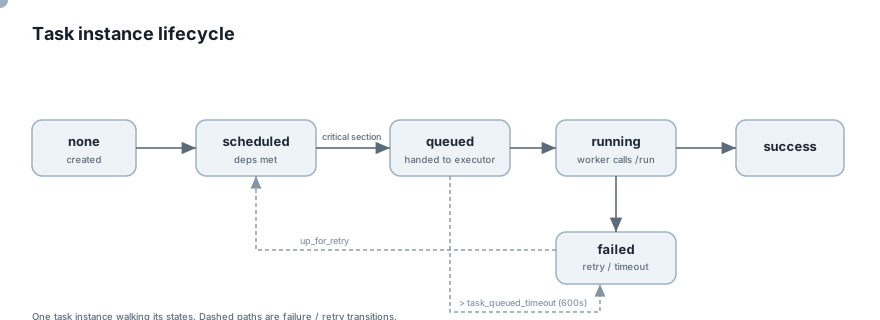
The scheduler loop, roughly (Scheduler):
- Check for DAGs needing a new DagRun, create them.
- Examine a batch of DagRuns for schedulable task instances.
- In the critical section (guarded by a row-level lock on the pool table), select schedulable task instances, respect pool and concurrency limits, and enqueue them to the executor: this is
scheduled → queued.
From there the executor’s queue_workload adds the task to its internal list, and on each scheduler heartbeat the executor processes those workloads; handing them to the broker (Celery) or launching a pod (Kubernetes). (BaseExecutor methods)
Two timeouts you must know, because they explain “failed with no logs”:
[scheduler] task_queued_timeout(default 600s): a task stuck inqueuedlonger than this is reaped; marked failed, no task logs in the UI. This usually means the broker is backed up or pods can’t schedule. (config ref)[scheduler] task_instance_heartbeat_timeout(default 300s): a running task that stops heartbeating to the API is presumed dead and marked failed, then rescheduled. OOM-killed tasks land here. (troubleshooting)
Set retries on every task. It’s the single cheapest thing that protects you from both timeouts turning a transient blip into a hard failure. (FAQ)
How a worker actually gets the task it runs
This is where Airflow 3 differs most from what you might remember. Follow one task instance from the scheduler to a running process.
The unit handed to an executor is a workload: specifically an ExecuteTask object. It carries the task instance identity, a JWT token, the relative DAG file path, and crucially a BundleInfo(name, version): which version of the code bundle to run (Executor workloads):
ExecuteTask(
    token="...jwt...",
    ti=TaskInstance(id=UUID(...), task_id="...", dag_id="...", run_id="...", try_number=1, ...),
    dag_rel_path=PurePosixPath("my_dag.py"),
    bundle_info=BundleInfo(name="dags-folder", version="..."),
    log_path="...",
    type="ExecuteTask",
)
With CeleryExecutor
- The scheduler’s executor enqueues the workload onto the broker (Redis).
- A persistent worker pod pulls the message off its queue when it has a free slot; the scheduler never targets a specific worker.
- The worker spins up a supervisor process for the task. On Linux the supervisor marks itself non-dumpable (
prctl(PR_SET_DUMPABLE, 0)) so a sibling task can’t read its JWT out of/proc. It then forks the task runner child that imports the DAG and runs your operator. (Workload isolation) - The worker ensures the bundle version named in the workload is present locally (for git-backed bundles, that’s a checkout of that version), then runs the task against that code.
- The task runner talks to the Execution API:
/runto transition torunning(the server issues a fresh short-livedexecution-scoped token), then heartbeats, pulls connections/variables/XComs, and reports state. It never touches the database directly. (JWT auth)

The JWT lifecycle is tuned to the queue: the workload token lives as long as task_queued_timeout (600s) so a task that waits in a backed-up queue can still authenticate when it finally starts; once running, the execution token (default 10 min) is transparently refreshed for the task’s duration. (JWT auth)
With KubernetesExecutor
There’s no broker and no persistent worker. On heartbeat, the executor’s execute_async launches a pod for the task. The pod’s entrypoint runs the task, materialises the bundle, and talks to the same Execution API. Same lifecycle, different delivery: the scheduler creates the pod instead of a warm worker pulling a message. (Executor concepts)
What happens if the code changes while a DAG is running
Here’s the question that motivates careful thinking about git-sync. You have a DAG run in progress (say task A finished and task B is about to start) and someone merges a change that git-sync pulls onto the workers. Which version of the code does task B run?
The Airflow 3 model: DAG runs are pinned to a version
Airflow 3 introduced DAG versioning. When a DAG run is created, it records a dag_version (a bundle_name + bundle_version). Every task instance carries that version, the UI shows it per run and per task instance, and there’s a Code tab that displays “the Dag source code as it was at the time this run was parsed… helpful for debugging version drift.” (UI docs)
Recall from the previous section: the workload sent to the worker includes BundleInfo(name, version). For a bundle that supports versioning, the worker checks out the pinned version and runs the task against it: not whatever is newest. So within a single DAG run, every task runs consistent code, even if newer code landed mid-run. New code is picked up by the next DAG run, which gets a new version. Workers keep several bundle versions on disk so older in-flight runs still have their code; the [dag_processor] stale_bundle_cleanup_* settings govern when old versions are garbage-collected (it keeps a minimum number and won’t delete versions in recent use). (config ref)
There’s an explicit escape hatch:
[dag_processor]
disable_bundle_versioning = False   # default: pin each run to a version
“Always run tasks with the latest code. If set to True, the bundle version will not be stored on the dag run and therefore, the latest code will always be used.” (config ref)
Leave it False unless you have a specific reason to want latest-always semantics.
The catch for this setup: git-sync uses the LocalDagBundle
This is the nuance that bites teams using the git-sync sidecar pattern from Part 1. Bundle versioning “only applies to bundles that support versioning.” The LocalDagBundle (a plain dags/ folder that the git-sync sidecar overwrites in place) is a single mutable directory. It doesn’t expose immutable, addressable versions the way a git checkout does. With git-sync into the dags folder, the practical behaviour leans toward “the worker runs whatever commit its sidecar last pulled”, and because each worker syncs independently, two workers can even be on different commits for tasks in the same run.
If you want true per-run pinning (task B in a run guaranteed to run the same commit task A did, regardless of what merged in between) the cleaner Airflow 3 mechanism is the GitDagBundle, where Airflow itself checks out a specific commit per version rather than relying on a sidecar mutating a shared folder:
[dag_processor]
dag_bundle_config_list = [
  {
    "name": "my-dags",
    "classpath": "airflow.providers.git.bundles.git.GitDagBundle",
    "kwargs": {"subdir": "dags", "tracking_ref": "main", "refresh_interval": 30}
  }
]
The trade-off is real and worth stating honestly:
- git-sync sidecar +
LocalDagBundle: dead simple, the deploy story in Part 1, DAG edits are instant, but versioning is “best effort / latest on disk” and you accept a small skew window across workers. GitDagBundle: Airflow owns the checkout, so DAG-run pinning is strict and consistent across workers, at the cost of letting Airflow manage git instead of a sidecar you already understand.
Neither is wrong. If your DAGs are idempotent and you keep period short, the git-sync approach is fine and is what we run. If you have long DAG runs where a mid-run code change could produce a genuinely inconsistent result, move that repo to a GitDagBundle and get hard pinning. Either way, Airflow 3’s UI Code tab per task instance is your forensic tool: it shows exactly what source that task parsed with, which is the first place to look when a run behaves unexpectedly after a deploy.
The one thing that’s always true
A task process, once it has started, runs the code it imported at start. The danger was never a single running process swapping code under itself; it’s the boundary between tasks in a long run, where a later task starts after a sync and parses newer code than an earlier task did. Airflow 3’s versioning closes that gap for versioned bundles; with git-sync you manage it by keeping DAGs idempotent and changes backward-compatible across a run’s lifetime.
Next: Part 4: XCom on object storage, secrets and connections, and Slack alerts.