Turn Your Coding Agent into a Grounded Coding Assistant
Using Docs-MCP-Server to give a coding agent retrieval over real, up-to-date library docs, so it stops inventing APIs that don't exist.
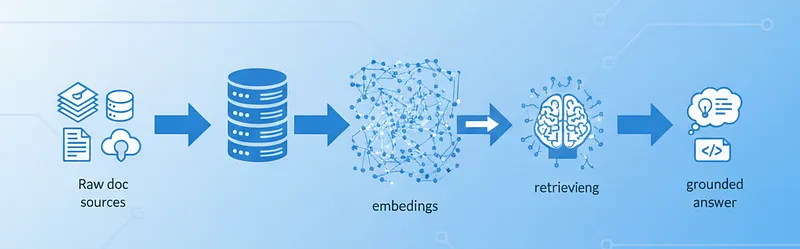
Large language models are good at producing code that compiles. They are noticeably worse at producing code that uses a library the way the library is actually designed to be used today. Training data has a cutoff; APIs do not. The result is the failure mode every working developer recognises: a function call with the right shape, the right name, and the wrong arguments, invented confidently from a pattern the model saw last year.
Docs-MCP-Server is one of the cleaner fixes for this. It scrapes the official docs of whatever libraries you actually use, indexes them locally, and exposes search over them via the Model Context Protocol. The agent can then retrieve the relevant passage before it writes the line that would otherwise be a guess.
What it does, mechanically
The pitch is small enough to state in one paragraph. You point Docs-MCP at a documentation source: a docs site, a GitHub repo, an npm or PyPI package, a local folder. It chunks the content, generates embeddings, and stores both alongside a full-text index. When your agent calls search_docs, the server runs a hybrid search (vector similarity plus keyword) and returns the most relevant passages. Your model reads those before generating.
What this buys you, concretely, is three things the base model can’t do on its own. It knows about APIs that postdate its training cut. It can answer in terms of the specific version you’re on, instead of averaging across all versions it has ever seen. And it has a citation to fall back on when it’s uncertain, which is usually when it would otherwise hallucinate.
Why embeddings, not keyword search
The reason embeddings matter here, and not just for fashion, is that the query the agent forms rarely uses the same words as the docs. A prompt about “an accessible button that supports keyboard activation” needs to find a section titled “Focus management and ARIA attributes for interactive elements,” and pure keyword search won’t bridge that. Embeddings turn both into vectors in a space where semantic similarity is a real distance. Hybrid search (embeddings plus a keyword index) keeps the precision of exact matches on things like function names and adds the recall of meaning-based lookup for the rest.
Wiring it up with LM Studio
The setup that’s been working for me runs the embedding model locally via LM Studio, which exposes an OpenAI-compatible endpoint. Docs-MCP doesn’t care whether the embeddings come from OpenAI or a local server; it only needs the API shape:
{
  "mcpServers": {
    "docs-mcp-server": {
      "command": "npx",
      "args": ["@arabold/docs-mcp-server@latest"],
      "env": {
        "OPENAI_API_KEY": "lmstudio",
        "OPENAI_API_BASE": "http://localhost:1234/v1",
        "DOCS_MCP_EMBEDDING_MODEL": "text-embedding-nomic-embed-text-v2-moe"
      },
      "disabled": false,
      "autoApprove": []
    }
  }
}
OPENAI_API_KEY is the literal string lmstudio because LM Studio ignores it; the base URL is the local server. Swap in your provider of choice if you’d rather not run embeddings locally.
What changes in practice
The most honest demo is the smallest one. Give the same prompt to the agent with and without Docs-MCP indexed:
“Create a new button component for a UI library that follows accessibility best practices and supports primary/secondary styling.”
Without retrieval, what comes back is a reasonable shape with the accessibility filed off:
function Button({ type = "primary", children }) {
  const className = type === "primary" ? "btn-primary" : "btn-secondary";
  return <button className={className}>{children}</button>;
}
There is nothing wrong with this code; there is also nothing accessible about it beyond the fact that <button> is the right element. No focus handling, no ARIA, no consideration for assistive tech, no opinion about which library conventions to follow because the agent has none.
With docs indexed for an actual accessibility library (React Aria is the one I tested against), the output changes shape because the agent has read the docs. It uses useButton, it forwards the ref, it accepts the props the hook expects, and it relies on the library’s aria-* handling rather than guessing:
import { useRef } from "react";
import { useButton } from "react-aria";

export function Button({ variant = "primary", children, ...props }) {
  const ref = useRef<HTMLButtonElement>(null);
  const { buttonProps } = useButton(props, ref);

  const className =
    variant === "primary"
      ? "bg-primary text-on-primary focus-visible:ring-2"
      : "bg-secondary text-on-secondary focus-visible:ring-2";

  return (
    <button {...buttonProps} ref={ref} className={className}>
      {children}
    </button>
  );
}
The difference is not that the second version is cleverer. It’s that the second version is grounded in a real API the agent retrieved before writing.
Indexing your docs
Once the server is running, indexing is a one-liner you give to the agent. The tool is called scrape_docs:
Use the
scrape_docstool from docs-mcp-server to index https://docs.example.com/ui-library as library “ui-library” version “2.3.0”.
The agent fetches, chunks, embeds, and stores. From then on, every search_docs call against that library/version returns content sourced from the docs you control, not whatever the model half-remembers.
What you actually get
This isn’t a silver bullet against hallucination (the model can still confabulate around the retrieved passages if you let it), but the failure rate on “imports that don’t exist” and “arguments in the wrong order” drops sharply once the docs are in the loop. The cost is one extra MCP server and the discipline of keeping your indexes fresh as libraries release. That’s a much smaller bill than the one you pay debugging plausible nonsense.
References
- Docs-MCP-Server on GitHub
- Model Context Protocol specification
- React Aria: useButton
- LM Studio: local OpenAI-compatible server
Originally published at https://medium.com/@moosezidan/turn-your-coding-agent-into-a-grounded-coding-assistant-b334d08d4e9a.